Moving your cat isn’t enough: when you work from home, they often come back to the keyboard a few minutes later. It usually helps more to change the setup: offer them a better spot beside you, give them attention in advance with play before meetings, and make the keyboard less inviting when you’re not using it. Instead of banning them from the desk, you can design a workspace for two and then decide whether to keep the door open or closed.
Why the desk attracts cats
Many cats choose the desk for several reasons at once. Often, it’s where you are. It’s elevated, and many cats like high places where they can observe the room. Laptops and chargers are often warm, and the heat can be very inviting. Then there’s the attention: every time you move them, talk to them, or turn toward them, your cat gets a response. For a cat seeking attention, even an annoyed reaction can work as a reward and make them more likely to try again. Rather than punishing them, it’s better to offer them elsewhere what they’re looking for here.
A better spot beside the desk
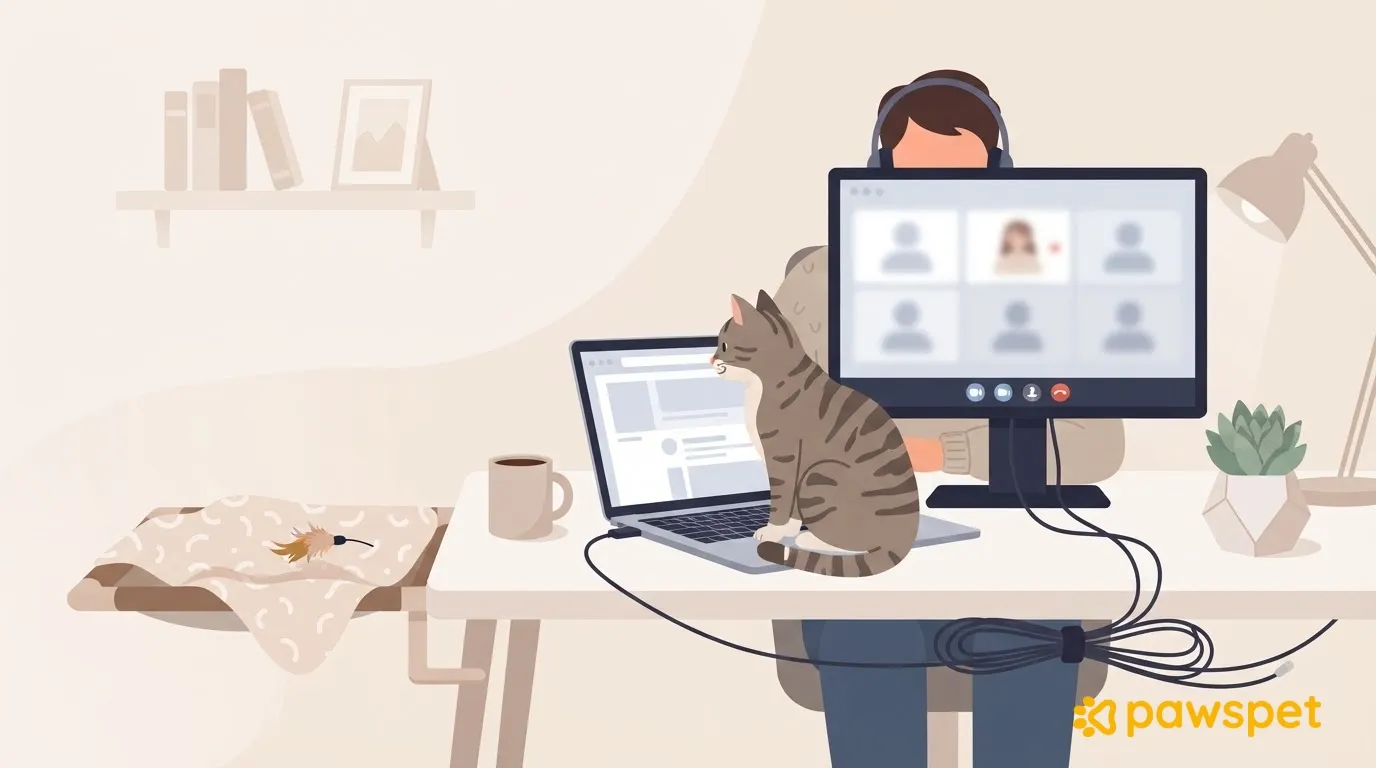
Set up a stable raised shelf or bed beside the desk, with a soft blanket that can provide an alternative to the warmth of your laptop. The spot should let your cat see you and the room while staying out of the video-call frame. When they use it, reward them calmly: with a pet or a small treat from their daily food allowance. If they ignore it at first, don’t force them; reward them whenever they climb up on their own. If the spot is near a window, remember to secure it.
Avoid spraying water or making sudden noises to get them away from the desk: these can increase stress and wariness.
Play before important meetings
Before a block of meetings, offer a short session of active play that mimics hunting: stalking, chasing, catching. Use a toy that moves like prey, and finish by letting your cat “catch” it. If you like, follow this with a small portion of their daily food: many cats tend to relax after hunting and eating, although this isn’t guaranteed. Also prepare a food-search game, where they have to find and retrieve treats, to offer at the start of the meeting.
For example, if you have a call at 11:00: play for about ten minutes at 10:30, offer a small portion of food at 10:45, and put the food-search game in their spot shortly before 11:00. These are suggested timings, not rules: adapt them to your cat and always count food and treats toward their daily allowance. If they tend to climb up at the same times, use those patterns to decide when to play.
To schedule these sessions at a regular time, you can create a recurring activity with a reminder in the PawsPet app: from the “Activities” tab, tap “+”, choose the type “Sports” » “Cat sports” » “Hunting games” (or “General” » “Free play and walks”), set the days and time under “Repeat”, add the reminder using the bell icon, and tap “Save”. Reminders arrive only if you set them up and have allowed notifications for the app; if you denied them, you need to turn them back on in your phone settings.
Keyboard, screen, and documents
When you get up, close your laptop or lock the screen so a paw on the keyboard won’t send messages or press keys by accident. Put away documents and pens: loose sheets can become an impromptu bed, and pens roll easily. When you’re not using the keyboard, cover it with something stable: a less accessible and less comfortable surface may be less inviting.
Door open or closed during calls
There’s no one-size-fits-all answer: observe your cat on ordinary days.
- Door open: this may be enough if, with the raised spot out of frame and play before the call, your cat tends to stay there or rest.
- Door closed: this is more suitable if they keep interrupting even then, or if the office isn’t safe for them yet. The litter box, water, food, and resting places should always remain accessible outside the office. Try it for a few minutes first, outside meeting times, and gradually make the periods longer.
If your cat meows or scratches at the closed door, open it when they’re calm, not while they’re in the middle of meowing; otherwise, they may learn that persisting works. If the closed door upsets them a lot, go back to shorter trials or keep the door open. If you have multiple cats, there should be enough resources for everyone outside the office.
Cables, small objects, and signs not to ignore
A workspace for two should also be safe:
- gather cables in cable channels or cable sleeves, or route the ones you can behind furniture;
- unplug chargers when they’re not needed;
- keep rubber bands, paper clips, thread, ribbons, and caps out of reach, and put away toys with strings after play;
- turn off and unplug devices with blades or moving parts, such as a paper shredder.
If you suspect your cat has swallowed thread, a rubber band, or a piece of cable, contact your veterinarian right away; don’t try home remedies. A veterinary check is also needed if attention-seeking or meowing suddenly increases, or if their appetite or litter box habits change.
For tomorrow, a little is enough: prepare the raised spot beside your desk and schedule the first play session before your next call.